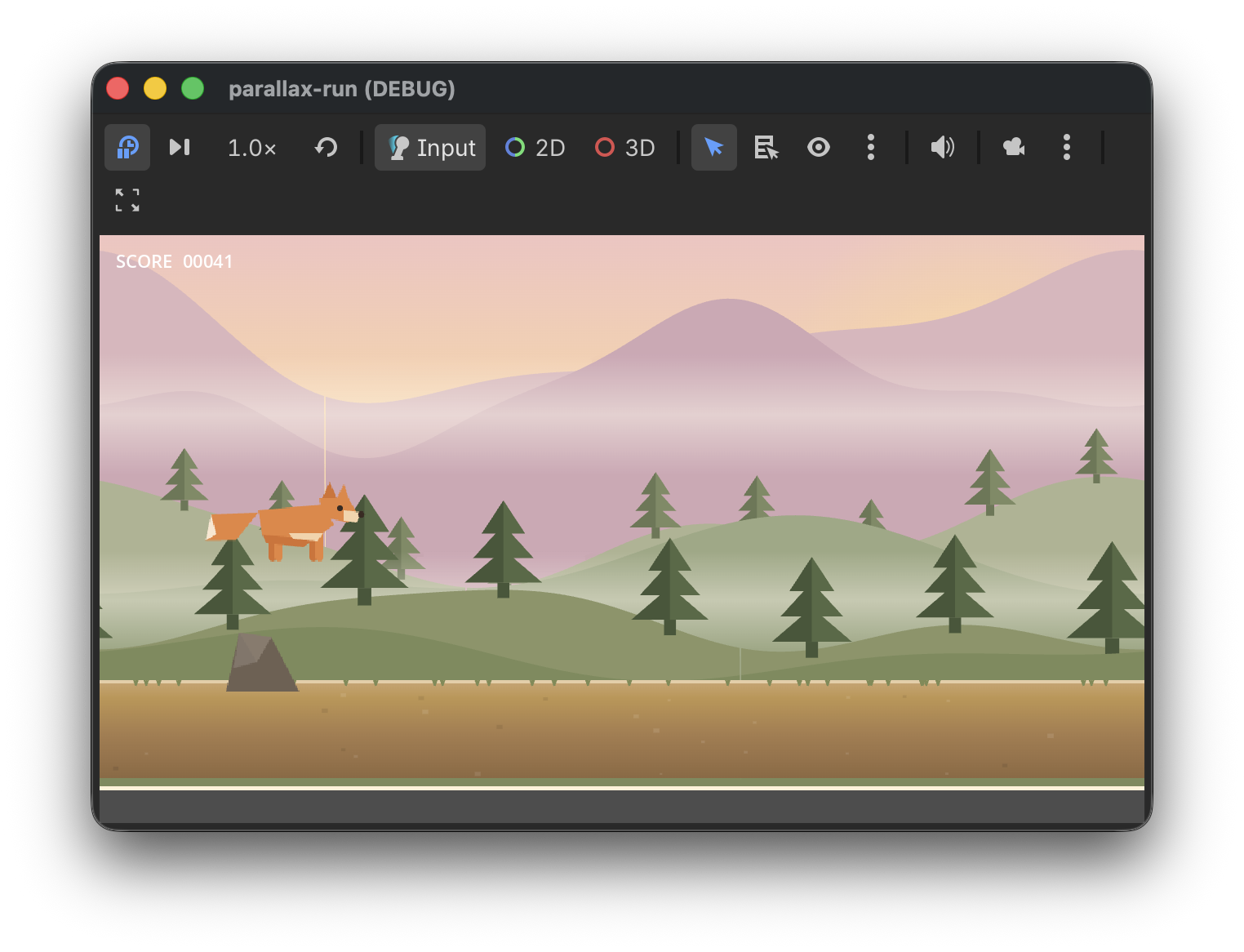
Build a 2D Endless Runner in Godot 4 — Part 3: Game States, Score, and Obstacles
A three-state game loop — IDLE, PLAYING, GAME OVER — wired up with a score counter, a random obstacle spawner that ramps speed, and an auto-reset that needs zero player input.
This is Part 3 of a three-part series. In Part 1 we built the parallax background. In Part 2 we added the player character and camera lock. Now we wire it all together into a complete game: a state machine, a score counter, obstacles that spawn and accelerate, and a loop that resets itself automatically after a game over.
The game loop
Three states, one enum:
IDLE      → player runs (no jump), "PRESS SPACE TO START"
              ↓ Space / tap
PLAYING   → obstacles spawn, score climbs, player can jump
              ↓ player hits obstacle
GAME OVER → "GAME OVER" shown, 2.5s pause
              ↓ timer expires
IDLE      → obstacles cleared, player revived, score reset
No input required to return from GAME OVER to IDLE — the timer handles it. This keeps the game mobile-friendly and removes any "press to restart" friction.
Game Manager
The root Node2D carries game_manager.gd. It owns the state machine, connects the player's died signal, drives the score counter, and delegates spawning to ObstacleSpawner.
## Root scene controller. States: IDLE → PLAYING → GAME_OVER → IDLE.
extends Node2D

enum State { IDLE, PLAYING, GAME_OVER }

@onready var _player: CharacterBody2D = $Player
@onready var _spawner: Node2D         = $ObstacleSpawner
@onready var _score_label: Label      = $UI/ScoreLabel
@onready var _msg_label: Label        = $UI/MsgLabel

var _score: float  = 0.0
var _state: State  = State.IDLE
var _revive_timer: float = 0.0

const REVIVE_DELAY := 2.5

func _ready() -> void:
    _player.died.connect(_on_player_died)
    _enter_idle()

func _enter_idle() -> void:
    _state = State.IDLE
    _score = 0.0
    _score_label.text = "SCORE  00000"
    _msg_label.text = "PRESS SPACE TO START"
    _spawner.clear_obstacles()
    _player.revive(false)       # runs but jump disabled in idle

func _enter_playing() -> void:
    _state = State.PLAYING
    _msg_label.text = ""
    _player.revive(true)        # jump enabled
    _spawner.start()

func _unhandled_input(event: InputEvent) -> void:
    if _state != State.IDLE:
        return
    if event is InputEventKey and event.pressed and not event.echo:
        if event.keycode == KEY_SPACE or event.physical_keycode == KEY_SPACE:
            _enter_playing()
    elif event is InputEventScreenTouch and event.pressed:
        _enter_playing()

func _process(delta: float) -> void:
    match _state:
        State.PLAYING:
            _score += delta * 10.0
            _score_label.text = "SCORE  %05d" % int(_score)
        State.GAME_OVER:
            _revive_timer -= delta
            if _revive_timer <= 0.0:
                _enter_idle()

func _on_player_died() -> void:
    if _state != State.PLAYING:
        return
    _state = State.GAME_OVER
    _spawner.stop()
    _msg_label.text = "GAME OVER"
    _revive_timer = REVIVE_DELAY
Why _unhandled_input instead of _input? Obstacles are Area2D nodes that listen for body collisions, but any node higher in the tree can consume input events first. _unhandled_input only fires if no other node already handled the event, so there's no risk of a stray Area2D swallowing the Space keypress.
Why gate _on_player_died on _state == PLAYING? The player's died signal could theoretically fire during GAME OVER (if there's already an obstacle on screen at the moment of the hit). The guard prevents a double-trigger that would reset the timer prematurely.
Obstacle Spawner
ObstacleSpawner is a plain Node2D with one job: instantiate obstacles off the right edge of the viewport at randomised intervals, and increment speed on each spawn.
## Spawns obstacles at random intervals just off the right edge of the viewport.
## Speed ramps up slightly with each spawn.
extends Node2D

@export var obstacle_scene: PackedScene
@export var ground_y: float = 680.0
@export var interval_min: float = 1.2
@export var interval_max: float = 3.2
@export var base_speed: float = 340.0
@export var speed_ramp: float = 12.0

var _timer: float = 0.0
var _next: float = 2.0
var _active: bool = false
var _speed: float = 0.0

func start() -> void:
    _active = true
    _speed = base_speed
    _timer = 0.0
    _next = randf_range(interval_min, interval_max)

func stop() -> void:
    _active = false

func clear_obstacles() -> void:
    for node in get_tree().get_nodes_in_group("obstacle"):
        node.queue_free()
    _active = false
    _timer = 0.0
    _speed = base_speed

func _process(delta: float) -> void:
    if not _active:
        return
    _timer += delta
    if _timer >= _next:
        _timer = 0.0
        _next = randf_range(interval_min, interval_max)
        _spawn()

func _spawn() -> void:
    if not obstacle_scene:
        return
    var cam := get_viewport().get_camera_2d()
    var right_edge: float = (cam.global_position.x if cam else 640.0) + 720.0
    var obs: Area2D = obstacle_scene.instantiate()
    obs.speed = _speed
    obs.position = Vector2(right_edge, ground_y)
    obs.add_to_group("obstacle")
    get_parent().add_child(obs)
    _speed += speed_ramp
The spawn offset of +720 past the camera centre puts obstacles roughly one full viewport width off-screen to the right. They scroll into view naturally rather than popping in at the edge.
ground_y = 680.0 matches the StaticBody2D floor from Part 2. Obstacles sit at this Y and their sprite is offset upward so their base appears to rest on the ground line.
add_to_group("obstacle") lets clear_obstacles() find every live obstacle via get_nodes_in_group without needing direct references — important because obstacles are added as children of the root scene, not the spawner.
Obstacle scene
Obstacle (Area2D)  ← obstacle.gd
├── Sprite2D       texture=obstacle_rock.png, scale=(1.4,1.4), position=(0,-42)
├── CollisionShape2D  RectangleShape2D(60,76), position=(0,-42)
└── VisibleOnScreenNotifier2D
# obstacle.gd
extends Area2D

@export var speed: float = 340.0

func _ready() -> void:
    body_entered.connect(_on_body_entered)
    $VisibleOnScreenNotifier2D.screen_exited.connect(queue_free)

func _process(delta: float) -> void:
    position.x -= speed * delta

func _on_body_entered(body: Node2D) -> void:
    if body.is_in_group("player"):
        body.on_hit_obstacle()
        queue_free()
VisibleOnScreenNotifier2D.screen_exited frees the obstacle automatically once it scrolls off the left edge. No manual cleanup needed during gameplay — only clear_obstacles() on game reset touches the obstacle list directly.
The sprite and collision shape share position.y = -42 so the obstacle's visual base lands at Y=0 (the node's local origin), which sits exactly on the ground_y = 680 floor.
UI setup
Both labels live in a CanvasLayer so they render at fixed screen positions regardless of camera movement.
UI (CanvasLayer)
├── ScoreLabel (Label)
│     offset_left=20, offset_top=16, offset_right=400, offset_bottom=48
│     font_size=22
│     text="SCORE  00000"
└── MsgLabel (Label)
      offset_top=300, offset_right=1280, offset_bottom=400
      font_size=28
      horizontal_alignment=CENTER
MsgLabel is full viewport width so horizontal_alignment=CENTER actually centres the text. The three strings it shows map directly to the three states:
| State | MsgLabel |
|---|---|
| IDLE | "PRESS SPACE TO START" |
| PLAYING | "" |
| GAME_OVER | "GAME OVER" |
The _can_jump bridge between manager and player
The game manager controls whether the player can jump by passing a boolean to revive():
# idle — player runs as part of the background parallax demo
_player.revive(false)

# playing — player can respond to input
_player.revive(true)
Inside player.gd the jump check honours that flag:
if _can_jump and is_on_floor() and Input.is_action_just_pressed("ui_accept"):
    velocity.y = JUMP_FORCE
This is how the game maintains a live parallax demo in the IDLE state without the player accidentally jumping before the round starts. The fox runs, the background scrolls, and nothing responds to input until the state machine says so.
Full game flow summary
1. Scene loads → _ready() → _enter_idle()
   • Player runs (no jump), parallax scrolls
   • "PRESS SPACE TO START", score = 0

2. Player presses Space → _enter_playing()
   • MsgLabel cleared, jump enabled
   • ObstacleSpawner.start() — first obstacle in 1.2–3.2s

3. Obstacle spawns every 1.2–3.2s
   • Speed increases by 12 px/s per obstacle
   • Player must jump over each one

4. Player hits obstacle → on_hit_obstacle() → died signal
   • _on_player_died() → State = GAME_OVER
   • Spawner stops, "GAME OVER" shown
   • 2.5s countdown begins

5. 2.5s expires → _enter_idle()
   • clear_obstacles() frees any remaining obstacles
   • Player revived at start position, jump disabled
   • Score reset, "PRESS SPACE TO START" shown
Checklist before pressing Play
game_manager.gdattached to root Node2D$Player.diedconnected to_on_player_diedin_ready()$ObstacleSpawner.obstacle_sceneexport set toobstacle.tscnObstacleSpawner.ground_y = 680.0UI/ScoreLabelandUI/MsgLabelexist in aCanvasLayerobstacle.tscnroot isArea2Dwithobstacle.gdandVisibleOnScreenNotifier2D- Obstacle Sprite2D
position.y = -42(base sits on floor at Y=680)
Press Play — the idle parallax demo runs. Press Space — obstacles start appearing. Jump over them. Hit one — Game Over. Watch the auto-reset fire after 2.5 seconds. That's the full loop.
The complete project — scenes, scripts, and assets — is available on GitHub. If you build something from this series, I'd like to see it.