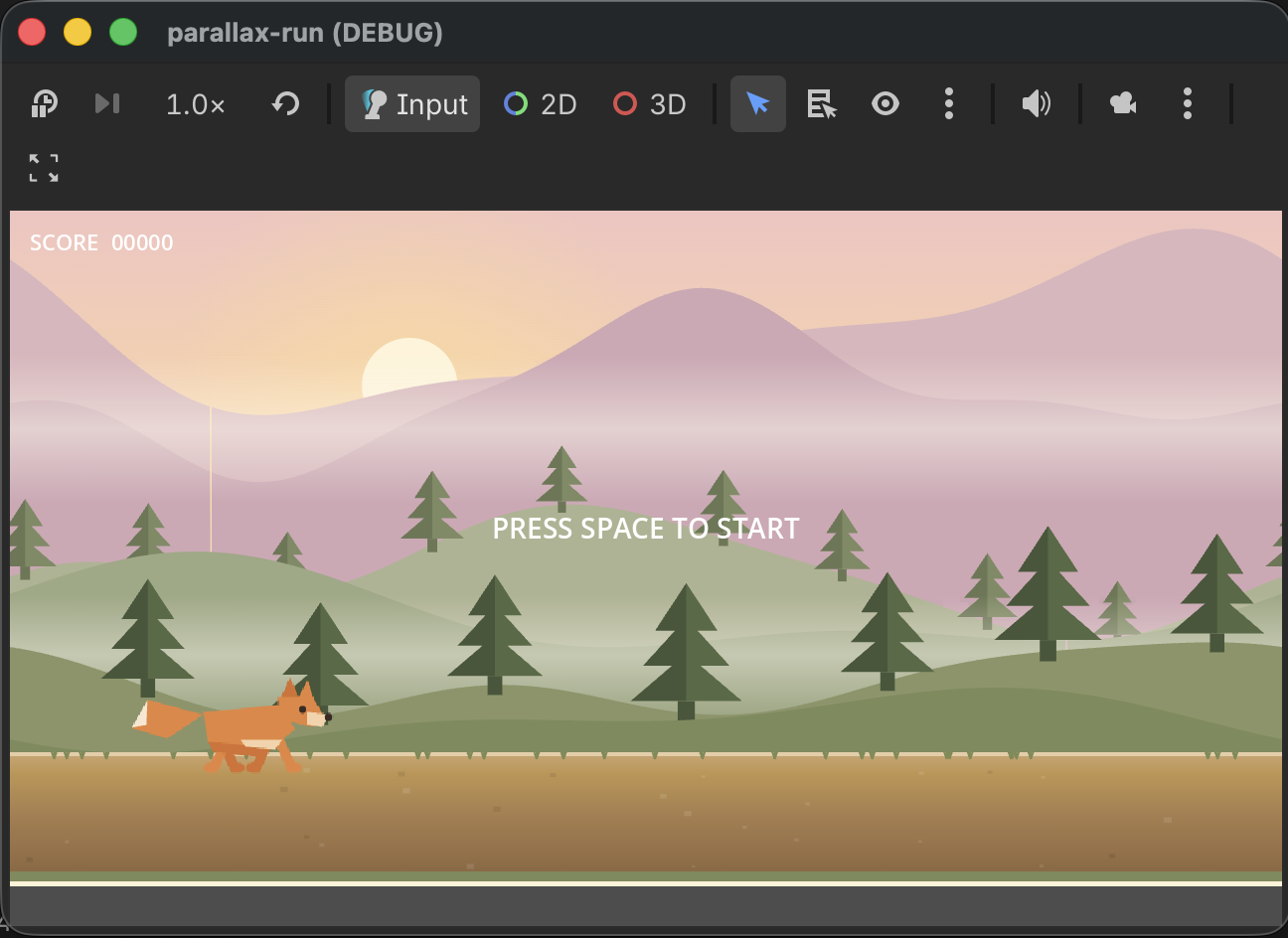
Build a 2D Endless Runner in Godot 4 — Part 2: Character Animation and Camera Lock
A running fox, a spritesheet animation loop, a physics floor that never has gaps, and a camera Y-lock that keeps the parallax background perfectly still when the player jumps.
This is Part 2 of a three-part series. In Part 1 we built a scrolling parallax background driven by two scripts and no built-in nodes. Now we add the player character: a pixel-art fox that runs continuously, animates from a 7-frame spritesheet, and can jump. The camera follows the player horizontally but its world Y is frozen — so the background doesn't bounce when the player leaves the floor.
By the end of this part pressing Space makes the fox jump and the background stays rock solid.
Physics floor — use WorldBoundaryShape2D
The obvious choice for a ground plane is a long RectangleShape2D. Don't. Use a WorldBoundaryShape2D instead — it's an infinite flat line with zero configuration and no edge-gap issues.
Ground (StaticBody2D)
  position = Vector2(0, 680)
  └── CollisionShape2D
        shape = WorldBoundaryShape2D
Place the StaticBody2D at world Y=680. That Y value matters — everything else (the player start position, obstacle placement in Part 3) anchors to this number.
Player script
The player is a CharacterBody2D. It runs at a constant horizontal speed, applies gravity each frame when airborne, and holds a jump-frame pose mid-air rather than continuing the run cycle.
## CharacterBody2D runner. Always runs and animates unless dead.
## Belongs to the "player" group so obstacles can identify it.
extends CharacterBody2D

const GRAVITY        := 1400.0
const JUMP_FORCE     := -680.0
const RUN_SPEED      := 280.0
const START_POS      := Vector2(250.0, 655.0)
const CAMERA_LOCK_Y  := 495.0

const RUN_FPS    := 10.0
const JUMP_FRAME := 3

signal died

var _dead := false
var _anim_timer: float = 0.0
var _can_jump := false

@onready var _sprite: Sprite2D = $Sprite2D

func _physics_process(delta: float) -> void:
    if _dead:
        return
    if not is_on_floor():
        velocity.y += GRAVITY * delta
    else:
        velocity.y = 0.0
    velocity.x = RUN_SPEED
    if _can_jump and is_on_floor() and (
        Input.is_action_just_pressed("ui_accept") or
        Input.is_action_just_pressed("ui_up")
    ):
        velocity.y = JUMP_FORCE
    move_and_slide()
    _animate(delta)
    $Camera2D.position.y = CAMERA_LOCK_Y - global_position.y

func _animate(delta: float) -> void:
    if not is_on_floor():
        _sprite.frame = JUMP_FRAME
        return
    _anim_timer += delta
    var frame_duration := 1.0 / RUN_FPS
    if _anim_timer >= frame_duration:
        _anim_timer = fmod(_anim_timer, frame_duration)
        _sprite.frame = (_sprite.frame + 1) % _sprite.hframes

func revive(allow_jump: bool = false) -> void:
    _dead = false
    _can_jump = allow_jump
    velocity = Vector2.ZERO
    global_position = START_POS
    _sprite.frame = 0
    _anim_timer = 0.0

func on_hit_obstacle() -> void:
    if _dead:
        return
    _dead = true
    velocity = Vector2.ZERO
    emit_signal("died")
A few things worth calling out:
_can_jump flag. Jump input is gated by this boolean rather than always-on. In Part 3 we'll have an IDLE state where the player runs in the background (the parallax demo) before the game starts. We don't want the player accidentally jumping during that demo. revive(false) leaves _can_jump off; revive(true) turns it on when the game actually begins.
_dead guard. The _physics_process early-return on _dead means velocity zeroes out and the character freezes in place for the brief Game Over window in Part 3.
revive() method. Rather than re-instantiating the scene, we reset the player in-place. This keeps the camera stable and avoids a scene reload on every game-over.
Camera Y-lock
This is the most important piece of this part. The Camera2D is a child of the Player so it automatically follows the player's X position. But we must prevent its world Y from changing when the player jumps — otherwise the parallax background visually lurches upward.
Each physics frame, one line handles it:
$Camera2D.position.y = CAMERA_LOCK_Y - global_position.y
Here's why it works:
CAMERA_LOCK_Y = 495.0is the desired world Y we want the camera to sit at- The camera's world position =
player.global_position + camera.position - We want
player.global_position.y + camera.position.y = 495.0 - So
camera.position.y = 495.0 - player.global_position.y
As the player jumps upward (global_position.y decreases), Camera2D.position.y increases by the same amount. The net world Y of the camera stays at 495 the whole time. The viewport never shifts vertically — the ground layer doesn't move, the mountains don't move, nothing moves except the player's sprite itself.
CAMERA_LOCK_Y = 495.0 derives from the player start Y (655) plus the camera's initial local Y offset (-60 in the Inspector, placed slightly above and ahead of the character). You only need to work this out once.
Spritesheet animation
The player spritesheet (player.png) is 1365 × 120 pixels — seven 195-pixel frames in a single row.
Inspector settings for the Sprite2D:
hframes = 7vframes = 1(default)scale = (1.25, 1.25)position = (0, -12)— centers the sprite visually on the collision box
Frames 0–2 and 4–6 are the running cycle. Frame 3 is the mid-jump pose. The _animate() method advances through all seven frames via modulo for the run cycle, then pins to frame 3 when the player is airborne. The accumulator pattern (_anim_timer += delta) means animation speed is framerate-independent — it runs at exactly 10 fps regardless of vsync.
Collision shape
The collision rectangle must cover the sprite's visual height, and its centre must account for the sprite's Y offset:
RectangleShape2D size = (50, 110)— matches the scaled sprite heightCollisionShape2D position = (0, -30)— shifts the box upward so its bottom sits on Y=0 (the character's feet)
The sprite's position.y = -12 and scale = 1.25 shift the visual centre upward. The collision box compensates so the bottom of the box aligns with the physics floor contact point. Without this the character hovers visibly above the ground.
Player group membership
The obstacle system in Part 3 needs to identify the player when a collision fires. Add the player to a group named "player" — either in the Inspector (Node → Groups tab) or in the .tscn file:
[node name="Player" type="CharacterBody2D" ... groups=["player"]]
The obstacle's collision handler will then do:
func _on_body_entered(body: Node2D) -> void:
    if body.is_in_group("player"):
        body.on_hit_obstacle()
        queue_free()
Scene hierarchy
Phase2Runner (Node2D)  ← game_manager.gd (Part 3)
├── BgSky … BgGround   ← same parallax layers from Part 1
├── Ground (StaticBody2D)      position=(0, 680)
│   └── CollisionShape2D       WorldBoundaryShape2D
├── Player (CharacterBody2D)   position=(220, 655), group="player"
│   ├── Sprite2D               scale=(1.25,1.25), position=(0,-12)
│   │                          texture=player.png, hframes=7
│   ├── CollisionShape2D       RectangleShape2D(50,110), position=(0,-30)
│   └── Camera2D               position=(80, -60)
├── ObstacleSpawner (Node2D)   ← obstacle_spawner.gd (Part 3)
└── UI (CanvasLayer)
    ├── ScoreLabel
    └── MsgLabel
The ObstacleSpawner and UI nodes can be empty placeholders for now — we wire them up in Part 3.
Checklist before pressing Play
GroundStaticBody2D at Y=680 withWorldBoundaryShape2DPlayerCharacterBody2D at(220, 655), group ="player"- Player Sprite2D:
hframes=7,scale=(1.25,1.25),position=(0,-12) - Player CollisionShape2D:
RectangleShape2D(50,110),position=(0,-30) - Camera2D child of Player:
position=(80,-60) parallax_layer.gduses onlydelta.x(Y zeroed — see Part 1)
Press Play — the fox runs and cycles through its frames. Press Space — it jumps. The background layers stay completely still during the jump. If the ground bobbles, the Y-zero in parallax_layer.gd is missing.
Next: Part 3 — Game States, Score, and Obstacles wires the full game loop: IDLE → PLAYING → GAME OVER → IDLE, with a score counter, obstacle spawner, and progressive difficulty.